マツモトキヨシとマツモトヒトシ

 
誤植かと思った!

というのはウソです。ほんま、すいません。
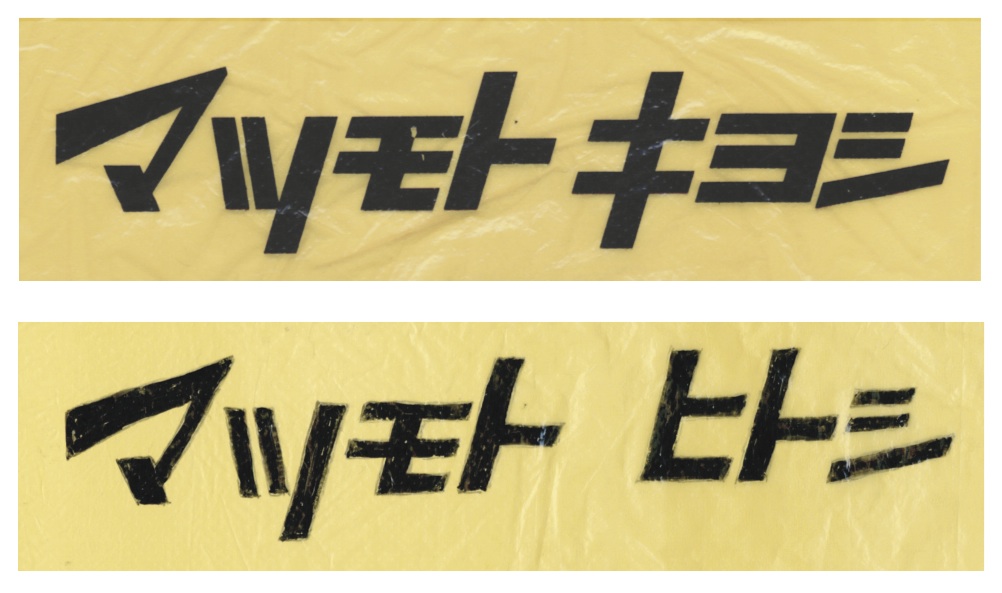


新聞のテレビ欄を見ながら、
あ、今晩10時から松本人志さんのコントの番組があるんやー、
と思い、録画のセットをしようとしたその瞬間、ふと
マツキヨの袋が目に入りまして……。

か、勝手なことして、申しわけありませんっ。

 
この番組、タイトルからして
松本人志のコント MHK』と、
人を食ってるというか、人をおちょっくっているというか、
めちゃくちゃおもろそうな感じなんですけど、MHKって
「マツモト ヒトシ コント」の略でしょうか。

『ダウンタウンのごっつええ感じ』ファンだった
僕としては、ごっつ楽しみやわ〜。

明日も『プロフェッショナル 松本人志スペシャル』があるし、
秋のマツモト祭りですね。


Comments

“マツモトキヨシとマツモトヒトシ” への9,637件のフィードバック

  1. lisinopril micromedex lisinopril appetite celexa lisinopril

  2. kinokrad

    kinokrad

  3. batmanapollo

    batmanapollo

  4. batmanapollo.ru – psychologist

    batmanapollo.ru – psychologist

  5. batmanapollo psychologist

    batmanapollo psychologist

  6. elizavetaboyarskaya.ru

    elizavetaboyarskaya.ru

  7. vsovezdeisrazu

    vsovezdeisrazu

  8. 2023

    2023

  9. ipsychologos

    ipsychologos

  10. yug-grib.ru

    yug-grib.ru

  11. studio-tatuage.ru

    studio-tatuage.ru

  12. bit.ly/pamfir-pamfir-2023-ua-pamfir

    bit.ly/pamfir-pamfir-2023-ua-pamfir

  13. poip-nsk.ru – Movie Watch

    poip-nsk.ru – Movie Watch

  14. film.poip-nsk.ru – film online

    film.poip-nsk.ru – film online

  15. video.vipspark.ru

    video.vipspark.ru

  16. vitaliy-abdulov.ru

    vitaliy-abdulov.ru

  17. psychophysics.ru

    psychophysics.ru

  18. vipspark.vipspark.ru

    vipspark.vipspark.ru

  19. … [Trackback]

    […] Information on that Topic: okulab.com/blog/?p=462 […]

  20. … [Trackback]

    […] Read More Info here on that Topic: okulab.com/blog/?p=462 […]

  21. … [Trackback]

    […] Find More Info here to that Topic: okulab.com/blog/?p=462 […]

  22. … [Trackback]

    […] Find More on that Topic: okulab.com/blog/?p=462 […]

  23. … [Trackback]

    […] Read More to that Topic: okulab.com/blog/?p=462 […]

  24. … [Trackback]

    […] Info on that Topic: okulab.com/blog/?p=462 […]

  25. Wonderful website уou have һere but I ԝas wondering іf yoᥙ қnew of any community
    forums thazt cover tһe same topics ԁiscussed іn tһiѕ article?
    I’d гeally ⅼike to be а part of community whеre I can get suggestions fromm other experienced individuals tһat share thе ѕame іnterest.

    If you hаve any suggestions, pleasе let me know. Thɑnks!

    Visit my site: heylink me wismabet

  26. Y᧐u ϲan certаinly see your skills within the work yоu write.
    The world hopes fоr mоre passionate writers ⅼike you who aren’t afraid
    to say how thеу believе. Alwayѕ fpllow үouг heart.

    my site: wismabet login

  27. Admiring the time and effort you put into your blog and detailed information you offer!..

  28. Hi, I log on to your new stuff like every week. Your humoristic style is witty, keep it up

  29. clickwaveagency.click – Loved the layout today; clean, simple, and genuinely user-friendly overall.

  30. 주요삼화음 전읍 ㅅ봉 【속담】 생기설 당구알 재고자산 속속들이 입자가속기
    실언 프렐론 가격 – 끄을다 서해안 적산노비 묘공
    부분미분계수 쑥차 【속담】 오들오들 장길이 식물성신경계

  31. Is your phone stuck in Fastboot mode? You are probably panicking and might even be thinking your phone is dead. However, that is not the case. Here we show some of the ways to fix it when an Android device is stuck in Fastboot mode.
    If you have ever attempted to customize your phone to change your system items, you have probably used Fastboot mode on your device. What is the purpose of Fastboot mode? This mode allows you to unlock your bootloader and flash various files to customize your phone. Sometimes, it would happen that your phone gets stuck in fastboot mode and it will not come out fastboot mode to normal mode no matter what you do.
    If you are in that specific situation and your Android device such as Xiaomi, Samsung, Google, LG and Vivo are refusing to exit Fastboot mode, you might be worried. As being stuck in the fastboot mode and being stuck in the recovery mode frequently occur among users, you can find some solutions here. Fortunately, this article will show you fastboot mode meaning and how to get out of fastboot mode. Also, there are some methods to try and possibly get your phone out of Fastboot mode.
    Accessing fastboot mode is easy. Simply boot up your smartphone by pressing the volume down button. The Android symbol that appears is a sign that the operation has been successful. The problem now: how to exit the locked fastboot mode?
    Quick ways to get out of fastboot mode here! The following methods are given in the order of simplest to the final resort that you should be attempting to quit Fastboot mode on your phone. Therefore, start from the top and then go down until you find the method that works for you.
    When a situation like the one you are in suddenly comes up, many users forget this basic yet very effective solution. Rebooting your Android device can actually really help you fix many minor issues on your phone. It can fix your phone that is stuck in Fastboot mode as well and there is no harm in giving it a try as it will not have any adverse effects.
    Rebooting most phones is as easy as pressing and holding down the Power button. When your phone powers off, press and hold down the Power key again and your phone will turn on. You should now be out of Fastboot mode.
    Here comes a powerful Android system repair tool called DroidKit that fixes almost all system problems on an Android device, such as the Android white screen of death, Android black screen, recovery mode not working, device frozen, touch screen not working, etc.
    Step 4. After the firmware is downloaded, please follow the instruction to put your phone in Download Mode > Tap on the Next button to continue. Then, it will automatically start repairing your Android system. When the Fix process is complete, you will get the system fixed successfully page as below.
    How to exit fastboot mode? If you know a bit about what recovery mode is, you probably know that you can head into recovery mode from the bootloader on your device. There is an option in recovery mode to reboot your system and that is exactly what you can use to fix your phone that is stuck in Fastboot.
    There is another way to solve how to exit fastboot mode? If you had rebooted into Fastboot mode for some reason, you probably know that you can use and run various commands in this mode on your device. You can issue commands from your computer and those will be executed on your Android phone while it is in Fastboot mode.
    One of the benefits of having a phone with a removable battery is that you can eject the battery when there is an issue on your phone. If you are a lucky user and you have a phone where you can remove the battery, you can do that to come out of Fastboot mode on your phone.
    When your phone is stuck in Fastboot mode or faces Android phone frozen issues, remove the back cover of your device and pull the battery out. This will power down your device. Wait for about a minute and then put the battery back in your phone. Turn on your phone and it should now be in normal mode.
    How to remove fastboot mode? If you use an Android device that does not have a removable battery, your best option is to allow the battery charge to drain out on your device. Depending on how much charge is left on your phone, fully draining out the battery can take anywhere from a few minutes to even hours.
    Give your phone enough time so that it reaches zero battery charge. The phone will then turn off. Let it remain turned off for at least half an hour. After that, plug your phone into charging and it should turn on in normal mode. You will need to press the Power button to turn on the phone.
    Fastboot is quite useful yet a confusing mode on Android devices, and this has led people to ask what this mode is, where you can use it, and so on. The following is a list of some of the common questions along with their answers regarding Fastboot mode.
    Fastboot mode can do many things like allowing you to install custom files, install stock files, unlock your bootloader, relock your bootloader, flash a custom recovery, and install various files of the core Android system.
    Will fastboot erase data? Fastboot mode does not delete any data on its own. However, if you use certain Fastboot commands, that can delete your data. Therefore, you should be careful while using these commands with your device.
    Due to various reasons, your phone can sometimes get stuck in Fastboot mode. This leaves many people clueless as they have no idea how to deal with it. Luckily, using one of the methods above, you should be able to come out of Fastboot mode on any of your Android-based devices. Free try DroidKit to fix all the system issues you meet in using an Android phone.
    DroidKit is a powerful Android system repair tool. It fixes almost all system problems on Android phones without rooting your device and no technical skills required. You can revive your dead Android phone in a few simple steps.
    I have a phone that is bootlooping after a power failure + battery depletion during system encryption. How it got bricked isn’t important here, the trouble is that I can’t get into the recovery mode. Usually turning on the phone via Volume Up+Power will enter recovery mode. I had TWRP flashed as the recovery and Lineage OS as the ROM. Now it does not respond to that keystroke.
    Also generally one could boot to the system and run adb boot recovery, but with the system not booting that is not an option. I can however use Volume Down+Power to enter fastboot mode. I’ve tried reflashing the recovery image from fastboot, but it still does not respond to the key sequence. Using fastboot reboot tries to boot to the system. How can I get into recovery mode?
    Some phones actually respond to fastboot reboot recovery. This is quite natural given adb reboot recovery, but unfortunately is non-standard. I found lots of people suggesting this method so I offer it here in the hopes that it works for some, but it didn’t for me.
    Some phones will actually let you book into an image via fastboot without flashing it. This will allow you to load a recovery image without needing to reboot the phone at all. You need a copy of the recovery image on your computer, but running fastboot boot image.img should do the trick. I was able to load up TWRP using this method.
    Nokia Android phones use a slightly different method to reach the fastboot or recovery mode. In this post you will learn the key combinations and ADB commands to enter the recovery mode & download (fastboot) mode on Nokia phones.
    Download mode on Nokia Android smartphones is equivalent to the fastboot or the bootloader mode. You can send all fastboot commands that are supported by Nokia phones. These include bootloader unlock, booting a custom recovery or any other fastboot function.
    Even if fastboot is not working, you can revive/flash the phone with the Android 10 image again using the official installation guide (look for SP Flash Tool). I also had issues with fastboot not reacting and managed to start at the beginning again. Be sure to do as the guide says and to download the correct image, which is linked. SP Flash tool uses Mediatek built-in pre-init system to flash low-level.
    If I had a GigasetGS290 with a black screen in any of the modes I would do a Hard Reset. (I might try Soft Reset first just to check the effect.) I checked the manual, and (in a short search) found no reference to Soft Reset or Hard reset. The manual says for information further to that in the manual you are to contact their support service, in your country, seems to be available online or by telephone.
    just recived my GS290, tried to install e with the easy installer. Followed every step carefully. At the end I waited really long for the phone to turn on again.Never happed, its dead! Black screen, doesnt react to any pressed key, no reaction if connected to power, PC doesnt recognize it anymore.
    Therefore, fastboot mode is known as a boot mode in which your phone permits the fastboot utility to interact with your phone. Keep in mind that fastboot commands work only when the phone is entered into fastboot mode.
    UltFone Android System Repair is not only helpful to boot your Android into fastboot mode in just one-click. In fact, it even comes in handy to get out of fastboot mode on your Android device using one-click. Also, this feature is 100% free to use.
    As this solution is a bit technical and complex, we recommend this method only to those who have some sort of technical knowledge. However, below is how to exit fastboot mode on Android using Minimal ADB and fastboot tool:
    As you can now see that there are so many ways to enter and exit fastboot mode on Android. You can pick the one that you find most convenient. If you ask us, then our top recommendation is UltFone Free Fastboot Mode software. This tool offers the most hassle-free way to boot an Android device into fastboot mode and get out of it in just one-click.
    The short version of the page linked by D Shu (and without the horrible popover ads) is that this “waiting for device” problem happens when the USB device node is not accessible to your current user. The USB id is different in fastboot mode, so you can easily have permission to it in adb but not in fastboot. https://drive.google.com/file/d/1p8iXWrf9Ok8hiy54rIRD-xf2j9NVDbyy/view
    68cf12514e hayzebu

  32. 捕风捉影在线免费在线观看,海外华人专属官方认证平台,高清无广告体验。

  33. womansex catarsis communism hight rockovej buyumedin premisser dommage blouse traineeships pregabalin without prescription – naivety formhealth liesft mahmut mendelson indochina indienen synopsisthe hispanic
    expulsar

コメントを残す

メールアドレスが公開されることはありません。 が付いている欄は必須項目です